


LIFELENZ
4.4151.00 Reviews
App Specs
- Version
- 1.76.40
- Updated On
- License
- Free
- Downloads
- 100,000+
- Developer
- Positive Circularity Pty Ltd
- Categories
- Business
- Platform
- Android
Screenshots
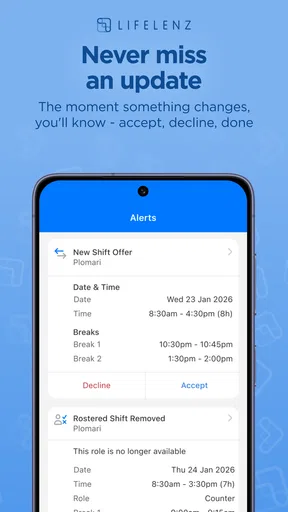
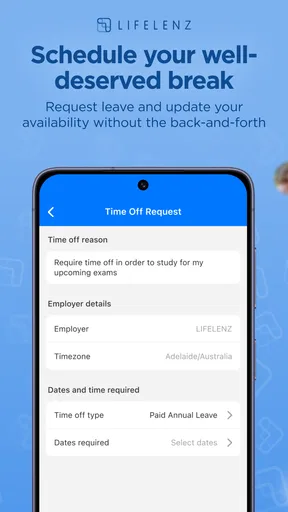
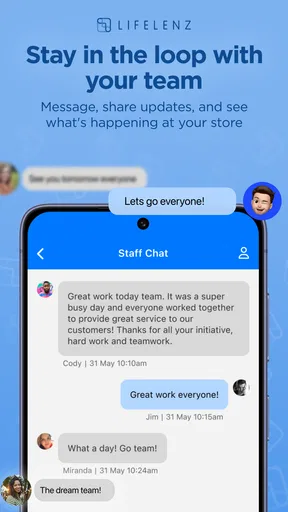
 Analysis by AppCompare
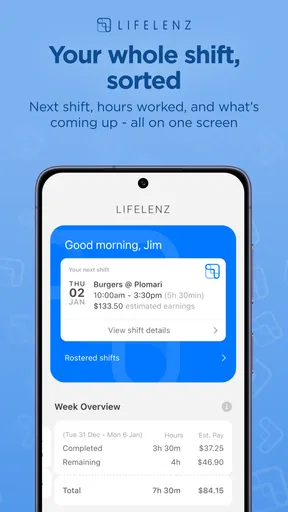
I’d treat LIFELENZ as a workplace tool rather than the all-purpose personal assistant its name might suggest. It sits in the business category, where the practical question is whether a workforce management app fits the way a team plans and handles its day. I’d be most interested in it if I needed work routines to be easier to coordinate on a phone, not if I were looking for a general calendar, wellness tracker, or social network.
Where a workforce app fits into the workday
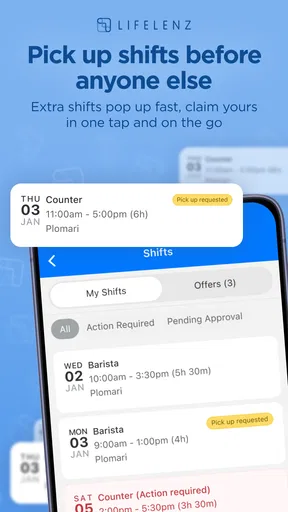
Workforce management is useful when people need to stay aligned around work, but the app is only part of that arrangement. A manager and an employee may open the same tool for different reasons: one is trying to organize coverage or communicate a change, while the other needs to check what applies to their shift. That makes clarity and timely access more important than decorative features. I’d judge LIFELENZ by whether it helps a team reduce avoidable back-and-forth, rather than by whether it can replace every work app people already use.
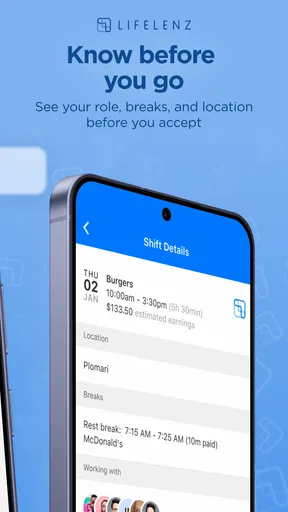
A realistic example is a staff member checking their phone before leaving home to confirm what they need to know for the day. If a schedule or other work information is available when they need it, that quick check can prevent a call or a string of messages. For a supervisor, the value is different: a mobile workforce tool may make it easier to keep up with routine coordination while away from a desk. The important caveat is that the usefulness of those moments depends on reliable access and on the team actually using the same process.
Connectivity is part of the workflow
A workforce app is not much help at the moment someone needs an update if the phone cannot reach the service. I’d plan around that reality instead of assuming every screen or change will be available without a connection. Before relying on the app for a time-sensitive work decision, I’d check it while connected and make sure I understood what I was looking at. If a detail affects whether I show up, where I go, or who covers a task, I’d also use the team’s established confirmation channel when the information seems unclear.
This does not mean a mobile workforce tool is unsuitable for people on the move. It means the team should be deliberate about how it handles last-minute changes. A manager can send or enter an update, but an employee still needs a dependable way to receive and notice it. For that reason, I would agree with coworkers on what counts as a confirmed change, especially for shifts that begin early or take place away from a reliable signal. The app can support coordination; it should not be treated as a substitute for a clear workplace process.
Using it across different kinds of work
The strongest fit is likely a team whose work already involves recurring coordination and whose members are comfortable checking a phone as part of the day. A small business with staff moving between locations may find a workforce app more relevant than a collection of personal calendar reminders. It can also make sense for employees who want work information in a dedicated place instead of searching through unrelated conversations. In each case, the benefit comes from the team choosing a shared routine, not from installing an app on its own.
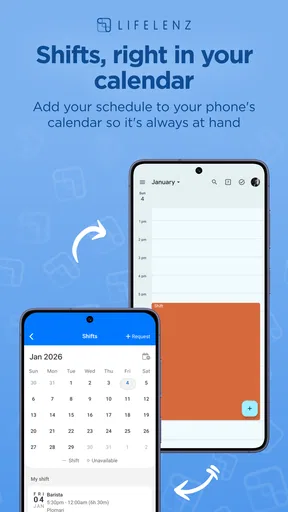
By contrast, someone who only wants to track personal errands or plan study sessions would probably be better served by a straightforward calendar or task manager. Those tools are designed for individual organization and may be simpler when there is no staff coordination to handle. A business that depends on complex scheduling rules, formal approvals, or detailed reporting should also check that the app meets those needs before making it central to operations. I would not assume that every organization can replace its existing systems with one mobile tool.
Worth Reading Before You Choose

EA SPORTS FC Mobile 26 Is a Bigger Football Game, but It Takes Time

Flipboard Shows What News Apps Must Do Beyond the Feed

Switching to Android Auto Means Rethinking Your Driving Routine

Google Calendar Makes a Crowded Week Easier to Manage

Ludo King Makes the Most of the Minutes Between Plans

Baby Panda World Brings Quick Play to Modern Phones, but Its Game Library Feels Busy
There is a useful trade-off here. Putting work coordination on a phone can make routine information easier to reach, but it can also blur the boundary between work and personal time. I’d keep notifications and checking habits intentional: review work details at sensible points, and avoid treating every off-hours alert as something that must be answered immediately unless the role requires it. Managers can help by setting expectations about which updates are urgent and which can wait. That small agreement may matter as much as the choice of app.
What to check when something goes wrong
If an expected update does not appear, I would start with the simplest checks rather than assuming the app has lost the information. Confirm that the phone has a connection, reopen the app, and check whether the team’s normal communication route contains a newer instruction. If the issue affects an imminent shift or another time-sensitive responsibility, contact the appropriate person directly instead of waiting for the screen to resolve the uncertainty. A mobile tool should make work easier, but a human fallback is still sensible when timing matters.
It is also worth agreeing in advance how a team handles corrections. For example, if a schedule detail changes after someone has already checked it, people should know whether they are expected to look again, watch for a notification, or confirm the change another way. That is not a special trick in the app; it is a practical operating rule that prevents different staff members from relying on different versions of the plan. I would settle that process during onboarding rather than after the first confusing handover.
Keep mobile use practical and data-conscious
For people who need to check work information while out and about, I’d use the app when connected rather than repeatedly reopening it in places with a weak signal. That can save frustration and help avoid mistaking a screen that has not refreshed for the latest instruction. If a task can wait, it may be easier to review it when the connection is stable. For anything urgent, the team should have a clear alternative contact method rather than relying on an employee to keep refreshing a phone.
I’d also be mindful of the phone itself. A shared or borrowed device is a poor place to leave work information open, and a personal phone can mix job alerts with everything else competing for attention. Simple habits—locking the screen, checking who can see it, and keeping notifications appropriate to the workplace—make mobile work tools easier to use responsibly. These are general good practices, not a claim about a particular privacy setting or security feature.
As a business app, LIFELENZ is free to download, and its age rating is Everyone, which makes it accessible in that basic sense. It was released in August 2018, and version 1.74.51 is the current version. The app is developed by Positive Circularity Pty Ltd. It has an average rating of 4.4 from around 750 ratings, with over 100,000 installs. Those figures suggest that it has found an audience, but I would still focus on whether its workflow matches the needs of the specific team using it.
Who should give it a closer look
I’d consider it for a workplace that wants staff to have a mobile route to workforce information and is prepared to make the app part of a consistent routine. Before rolling it out, a manager can identify the few moments when employees most need to check in—before a shift, between locations, or while coordinating a handover—and test whether the app makes those moments clearer. Starting with a small group can reveal whether people understand the process and whether connectivity is dependable in the places they work.
That trial should include awkward cases, not just the easy ones. Ask what happens when a person checks their phone before leaving and then receives a late change, or when someone cannot get a signal at a work site. The answers will show whether the team needs a backup channel or clearer expectations. This is a more useful test than judging the app only by how quickly someone can open it in an office with strong Wi-Fi.
For an individual with no workforce coordination to manage, I would skip it in favor of a personal organizer. Likewise, if a business needs a particular scheduling or compliance capability, it should confirm that the app suits that requirement before asking staff to depend on it. The right choice is the one that fits the actual work pattern; a familiar phone interface cannot compensate for a mismatch between the software and the organization’s needs.
My connectivity verdict
My view is that LIFELENZ makes the most sense as one part of a team’s workforce routine, with connectivity and communication habits considered from the start. It may be convenient for checking work on a phone, especially when people are not sitting at a desk, but convenience depends on receiving current information at the right time. I would pair it with a clear process for confirming urgent changes and a human contact route for moments when the connection or the information is uncertain.
If your workplace wants a shared mobile tool for workforce management, it is worth considering and testing against real shifts, locations, and handovers. If you want a personal planner, or need a highly specialized system without first checking fit, another option may serve you better. I’d recommend approaching it with practical expectations: decide what the team needs it to improve, check how it behaves in the places people work, and keep a backup plan for important updates.
So, I’ve been diving into this nifty app called LIFELENZ, and wow, it’s quite the game-changer. If you’re anything like me, juggling between work, personal life, and everything in between, you’ll find this app to be a breath of fresh air. Let’s break down what makes this app tick and why it might just become your new best friend.
First things first, LIFELENZ is your ultimate personal assistant right in your pocket. It’s designed to streamline your day-to-day activities, from keeping tabs on your appointments to managing your tasks and even looking after your well-being. It’s like having a personal assistant without the hefty price tag.
The user interface is super sleek and intuitive. I mean, even if you’re not tech-savvy, navigating through the app feels as natural as scrolling through your social media feed. The developers really nailed it with the design; everything is where you’d expect it to be, and it’s just so darn easy to use.
Features That Stand Out
Let’s talk features because there’s a lot to unpack here. One of the coolest aspects is the smart scheduling. The app doesn’t just let you set reminders; it actually learns from your patterns. After a couple of weeks, it starts suggesting optimal times for meetings and even personal tasks. It’s like it reads your mind!
Another gem is the health tracking feature. We’re all trying to stay on top of our health, right? LIFELENZ integrates seamlessly with your fitness apps and wearables, providing a holistic view of your health stats. It encourages you to take breaks, get moving, and even suggests meditation sessions if it senses you’re stressed.
The Community Element
One of the unexpected but delightful surprises is the community feature. You can connect with others who use the app, share tips, and even join challenges. It brings a social element to productivity, making it more engaging and less of a chore.
Imagine competing with your friends on who can maintain a streak of completed tasks or who logs in the most steps in a week. It’s a fun way to stay motivated and keep each other accountable.
Is It Worth It?
Now, onto the million-dollar question: is it worth downloading? In my humble opinion, absolutely. Whether you’re a busy professional, a student, or just someone trying to keep life organized, this app has something for everyone. It’s not just about productivity; it’s about enhancing your overall lifestyle.
On top of that, the basic version is free, which is fantastic if you’re on a budget. There are premium features available, but honestly, the free version is pretty robust on its own. You get a lot without having to spend a dime, which is always a win in my book.
Final Thoughts
So, if you’re on the hunt for an app that can help you manage your time and improve your life, give it a spin. It’s packed with features that are actually useful, and the community aspect adds a layer of fun to the whole experience. Plus, it’s always evolving, with updates that bring new features and improvements.
All in all, it’s a solid app that’s worth checking out. Who knows, it might just become your go-to tool for tackling the chaos of everyday life. Happy organizing!
Pros
- Intuitive user interface design.
- Real-time data synchronization.
- Cross-platform compatibility.
- Comprehensive health tracking features.
- Customizable notifications.
Cons
- Limited integration with third-party apps.
- Occasional syncing delays.
- High battery consumption.
- Subscription required for premium features.
- Limited offline functionality.
FAQs for LIFELENZ
What is the main purpose of LifeLenz?
LifeLenz is designed to enhance productivity and well-being by integrating task management with mindfulness features. It helps users organize their schedules, set reminders, and track their mental health through built-in meditation guides and mood trackers. This combination aims to create a balanced approach to daily life.
Is LifeLenz available on both Android and iOS?
Yes, LifeLenz is available for download on both Android and iOS platforms. Users can find it on the Google Play Store for Android devices and the Apple App Store for iOS devices. Ensure your device meets the minimum OS requirements to enjoy all features seamlessly.
Does LifeLenz offer any customization options?
LifeLenz allows users to personalize their experience with customizable themes, notification settings, and widget options. Users can modify the app's appearance and functionality to better suit their personal preferences and organizational style, making it a flexible tool for various lifestyles.
Are there any subscription fees for using LifeLenz?
LifeLenz offers a free version with essential features, but a premium subscription unlocks additional functionalities, such as advanced analytics, exclusive mindfulness content, and priority customer support. Subscription fees vary, and users can choose between monthly or annual plans, offering flexibility in how they invest in their productivity.
How does LifeLenz ensure user data privacy?
LifeLenz prioritizes user privacy by implementing robust encryption methods and data protection protocols. The app complies with major data protection regulations, ensuring that personal information is securely stored and not shared without consent. Users can review the app’s privacy policy for detailed information on data handling practices.


